yuru web & ai engineering
windows app · free

notepad mint

a free replacement for notepad.exe, for anyone who wanted the plain one back. plain text, a dark theme by default and a light one, every encoding, and nothing that phones home. it is written in raw c and 32-bit x86 assembly with no c runtime, so the whole editor is a single exe of about 166 kb that runs on 32-bit windows, 64-bit windows and windows on arm.

what it is
a drop-in replacement for notepad.exe: the same menus, status bar and wording, plus the extras below
built with
raw c and 32-bit x86 assembly. no c runtime, no third-party code, no windows.h: the win32 declarations are written by hand and proven against the real sdk on every build
runs on
one 32-bit exe for 32-bit windows, 64-bit windows and windows on arm
size
166 kb for the editor. the project's hard limit is 300 kb, and every build is checked against it
privacy
none collected. no ai, no sign-in, no telemetry, and no network code in the exe at all
price
free, with the source public on github

dark and light

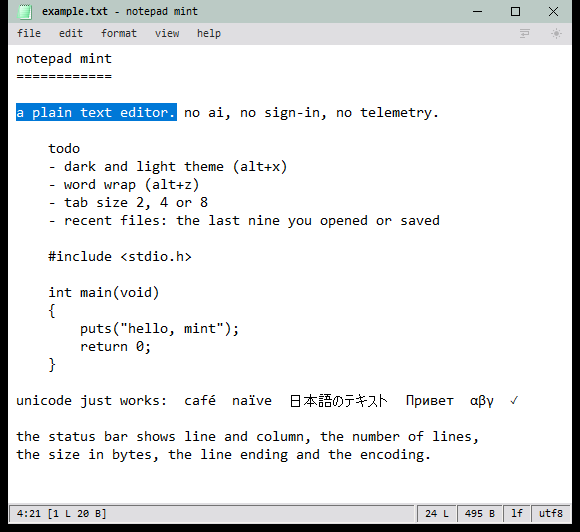
dark is the default, with a mint accent. alt+x, or the sun and moon button at the right of the menu bar, switches to the light theme.
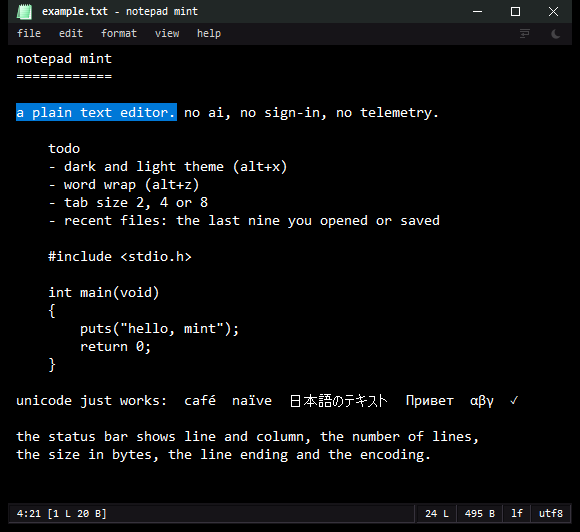
notepad mint with the dark theme: a short text with a selected sentence, a code sample and multilingual text, and the status bar showing line, column, size, line ending and encoding
dark
notepad mint with the light theme, showing the same text on a white editor with a soft green accent
light

three things worth knowing

it is a text editor, so most of what it does is what you already expect. these are the parts that are on purpose.

01

small is a rule, not a result

the exe has a hard ceiling of 300 kb, "notepad size", and the build fails above it. so every feature is glue over what windows already ships: the stock edit control, the native open and save dialogs, the print dialogs. nothing is bundled. it imports only kernel32, user32 and gdi32, and loads the few other system dlls it needs at run time.

02

it behaves like notepad first

same menus, same wording, same status bar. drop a file on the window and it opens, like notepad. xp's header and footer print codes, /p and /pt, classic .LOG files and f3 following the direction you searched are all there. the extras sit on top of that and stay out of the way.

03

an undo history you can trust

version 1.3.0 added a real one: 128 steps with redo, grouped the way a person thinks (a line of typing is one step, a run of backspaces is one step, replace all is one step), with the caret and selection put back where they were. it survives a word wrap toggle, and undoing back to the saved text clears the modified mark at any depth.

what you get

every encoding

utf-8 with or without a bom, utf-16 in both byte orders, every installed code page, and reopen with another encoding. windows, unix and classic mac line endings, picked from the status bar.

every script

right to left text switches itself on from the first letter (hebrew, arabic), or by hand. ime input, unicode control characters and per-monitor dpi are handled.

find and replace

whole word, match case and wrap around, up or down, remembered between sessions. search is linear-time, including backwards, so a big file stays quick.

drag and drop

drop a file to open it, or hold shift to insert its path. drag selected text to move it, hold ctrl to copy, and drag it to or from other programs.

printing

header and footer codes like xp's notepad, selection-only printing, a cancel window, and /p and /pt from the command line.

safer saves

writes and flushes a temporary file before replacing yours, warns before a lossy encoding, saves through links, and asks before overwriting a file that changed under it.

word wrap and zoom

alt+z toggles wrap, ctrl+plus and ctrl+minus zoom the font, ctrl+0 resets. the tab size is 2, 4 or 8 and the font is yours to pick.

the default editor

the installer lists it under open with and in default apps for .txt, .log, .md and more. help > set as default text editor does the same for the standalone exe.
raw c x86 asm no c runtime 166 kb no telemetry dark + light

how it is checked

a claim in the readme is a command you can run. tools\verify.bat ui builds the exe with zero warnings, fails if it is over 300 kb or imports anything beyond the three dlls, and then runs the checks.

466 unit checks (including randomised search cases and file-failure injection), 42 printing checks, and about 1,100 gui checks that drive the real exe on a private desktop, so nothing shows on screen while they run. undo and redo alone are covered by a randomised test that edits against a text model and walks the history down and back up. what stays outside the automated checks is anything that needs real hardware input: a physical key press, a real drag between two programs, a real printer.

download

both come from the latest release on github, with a SHA256SUMS.txt to check them against. the exe is not code-signed yet, so windows smartscreen may ask once before it runs.

installer
setup.exe
per-machine, with an uninstaller
  • start menu shortcut, optional desktop shortcut
  • listed under open with and default apps
  • your settings stay when you uninstall
standalone
one exe
nothing to install
  • put it anywhere and run it
  • settings in %appdata%\notepad-mint
  • help > set as default text editor works too

why we build it

because the plain notepad was worth keeping, and because a hard size limit, a hand-written win32 header and a test suite that runs the real exe are a good way to stay honest about what a small piece of software actually does. the same habits go into the client work.